
BullionPulse
User Guide
BullionPulse is built for physical gold, silver, platinum and palladium investors who want a calm, local-first way to track their portfolio, record buys and sales, understand realised profit and loss, and export professional records.
1. What You Can Do with BullionPulse
Portfolio overview
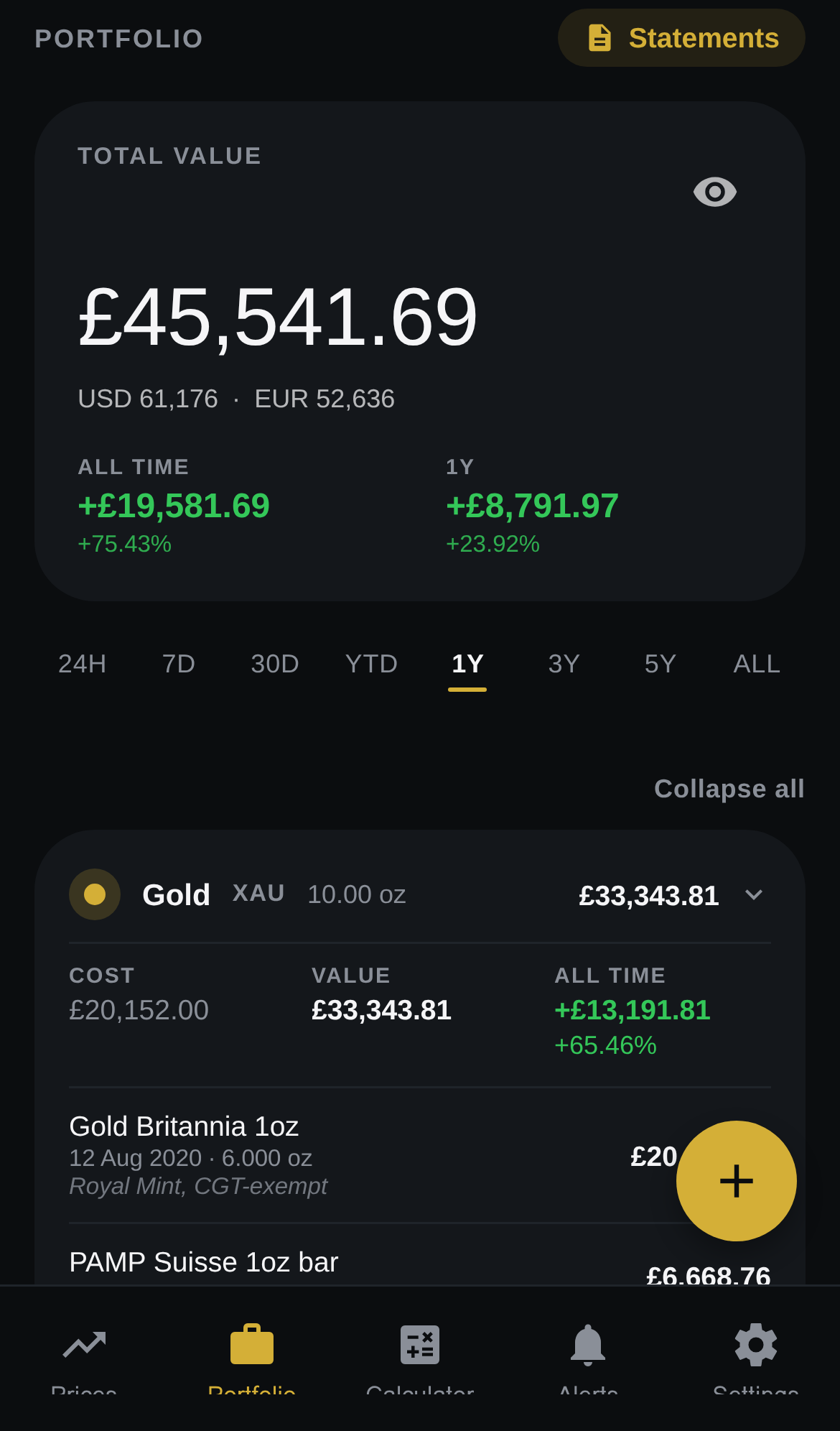
View the total value of your bullion stack, see performance information and review per-metal holding cards.
Prices
View live spot prices for gold, silver, platinum and palladium with delay-aware labelling.
Transactions
Record bullion purchases and sales, keep transaction history and view sale details.
Realised P&L
Use FIFO-based matching to understand per-sale realised profit and loss.
Multi-currency
Use a base currency, with Premium support for up to two additional display currencies and mixed-currency sale handling.
Reporting
Use Profit & Loss Statement, Performance P&L and Portfolio Statement views, with Premium unlocking full tables, advanced periods, tax-year views and export.
2. Getting Started
| Step | Action | Result |
|---|---|---|
| 1 | Choose your base currency when setting up your portfolio. | Portfolio values and realised results are anchored to the selected base currency. |
| 2 | Add physical holdings as buy transactions. | The app builds the portfolio and transaction ledger from the purchase records. |
| 3 | Review the Portfolio screen. | The total portfolio value, performance indicators and per-metal cards become the main everyday view. |
| 4 | Record sales when holdings are disposed of. | BullionPulse can calculate individual sale realised P&L using FIFO matching. |
| 5 | Use Statements when you need records. | Free users can see preview information; Premium users can access the full reporting and export layer. |
3. Portfolio Screen
The Portfolio screen is the main outcome view. It answers the question a bullion owner opens the app to ask: what is the whole stack worth, and how has it performed?
Total value
Overall portfolio value in the base currency, with visible secondary currencies where configured.
Performance figures
Quick view of portfolio movement and all-time or period-based comparisons.
Per-metal cards
Metal-level cost, value and gain information.
Privacy hide
Supports discreet use in public and reinforces the local-first privacy posture.
4. Prices and Charts
Live spot prices and price history charts for gold, silver, platinum and palladium. The app shows live spot prices with delay-aware labelling, not a tick-level brokerage or trading feed.
Chart ranges
24H, 7D, 30D, YTD, 1Y, 3Y, 5Y and ALL with touch-to-inspect behaviour.
Secondary currencies
Premium users can view prices in up to two additional display currencies.
5. Recording Purchases and Sales
Record buys and sells so the app can maintain an audit trail of bullion ownership and calculate realised profit and loss when holdings are disposed of.
| Type | What to record | Why it matters |
|---|---|---|
| Buy | Label, date, fee and notes | Forms the cost basis for later holdings, performance and realised P&L |
| Sell | Sale records matched using FIFO logic | A disposal becomes a calculated realised result |
| Mixed-currency sale | Captured sale-time FX rate, date, source and provider | Records the sale result honestly in the base currency |
6. Understanding FIFO Realised P&L
FIFO means the earliest eligible purchases are matched first when a sale is recorded. This produces per-sale realised P&L and distinguishes BullionPulse from simpler price or holdings trackers.
Important
BullionPulse provides portfolio tracking, realised P&L and record-keeping features. It is not tax advice, investment advice or a guarantee of formal compliance.
7. Statements and Reports
Free users can open Statements and see preview information, while Premium unlocks the full reporting and tax-oriented layer.
| Statement | User benefit | Premium boundary |
|---|---|---|
| Profit & Loss | Consolidated realised position across the portfolio | Full transaction tables and advanced periods |
| Performance P&L | Performance information with FX-converted views | Full detail beyond headline figure |
| Portfolio Statement | Holdings ledger for record keeping | Full ledger-style reporting and exports |
8. Alerts
Alerts are evaluated only while the app is open. They are in-app alerts you will see when you open the app, not background push notifications.
Price alerts
Free: up to two. Premium: unlimited.
Portfolio-value alerts
Premium feature.
9. Getting Help
For all BullionPulse support enquiries, contact [email protected].